LoopScore

Music notation for modern musics.

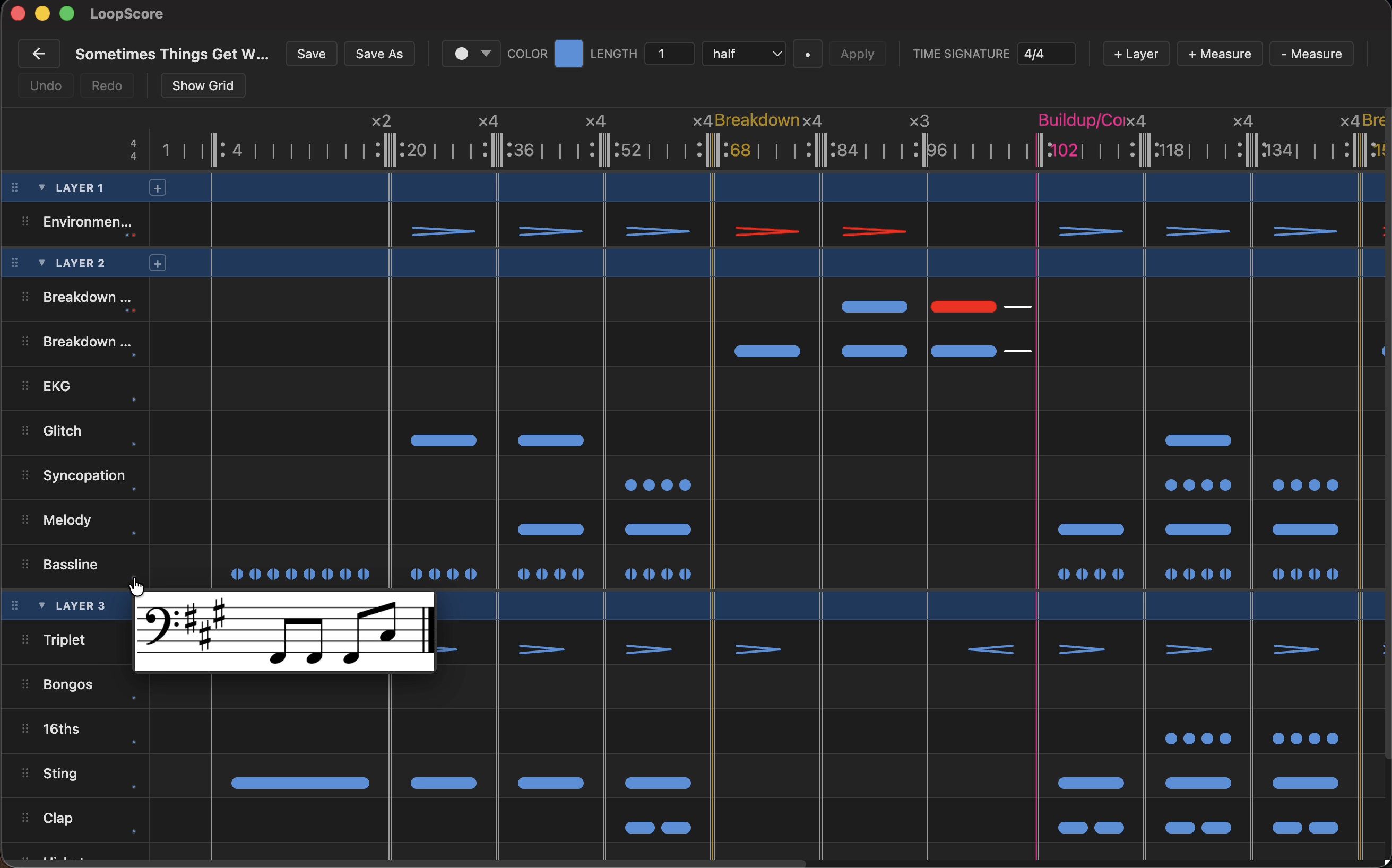
LoopScore is an application for notating and analyzing loop-based music. It introduces Loop Notation — a new system for representing musical structure, heavily inspired by the visual language of EDM production in DAWs and touch pads. Developed for composers and producers working in loop-based forms.

LoopScore example score

Download & Install

Download for Windows

Requirements

  • Windows 10 or Windows 11 (64-bit)

Installation Steps

  1. Download the installer from the link above.
  2. Double-click loopscore-1.0.0 Setup to run the installer.
  3. Windows may show a SmartScreen prompt ("Windows protected your PC") because the app is unsigned. Click More info, then Run anyway.
  4. The installer runs silently and finishes in a few seconds. LoopScore will launch automatically and a shortcut will be added to your Start Menu.

First Launch

LoopScore will ask you to choose a base folder for your .lscz composition files. This can be changed later in Settings.

Uninstalling

  • Open Settings → Apps (Windows 11) or Control Panel → Programs and Features (Windows 10), find loopscore, and click Uninstall.
  • Or run: %LocalAppData%\loopscore\Update.exe --uninstall
  • Your .lscz files are not deleted.

Requirements

  • macOS 11 (Big Sur) or later

Installation Steps

  1. Download the application from the link above.
  2. Unzip the file and drag LoopScore into your Applications folder.
  3. Bypassing Gatekeeper: Because LoopScore is not yet signed, macOS will block it on first launch. To open it:
    • Right-click (or Control-click) the LoopScore icon in Applications.
    • Select New Terminal at Folder from the context menu.
    • Type xattr -rd com.apple.quarantine . in the Terminal window and press Enter to run.
    • Return to the Applications folder and click the LoopScore icon to open.
    • You only need to do this once. Future launches work normally.
  4. On first launch, LoopScore will ask you to choose a base folder for your .lscz composition files.

Uninstalling

  • Drag LoopScore from Applications to the Trash.
  • Your .lscz files are not deleted.

Example Scores

High Life

by Daft Punk

Download

Sometimes Things Get Whatever (Album Mix)

by deadmau5

Download

Feedback